Json Based Alerts Mapping
Any alert that is ingested into the AIOps system needs to go through the Alert Mapper that is assigned for the source that sends the alert. One alert source can have multiple mappers that can be designed for different use cases. If multiple mappers are configured for an alert source, each event will go through every configured mapper and will create an alert object based on the mapping rules. It is the responsibility of the mapper to filter the events if they need to handle specific use-cases.
Note
If not handled properly, multiple mappers can result in duplicate alerts to be generated
When a new alert is ingested, if a Condition block is present in the mapper, it is evaluated first. Based on the conditions provided in the condition block, mapper identifies whether to process or reject the incoming alert payload.
Next, Payload and Events blocks are evaluated. Payload block is used to extract a usable payload from the incoming alert. Events block is used to extract a set of sub-alerts from the incoming alert and treat each sub-alert as an individual alert. Only one of these two blocks can be used in the mapper; if both are defined in the mapper, the Payload block will be evaluated.
Finally, the Mappings block is evaluated. This block contains a set of rules that are used to extract attributes from incoming alerts and set as alert attributes. Additional functions can also be applied to an attribute before setting as alert attributes.
The final mapped alert is created in the AIOps system for further processing.
Note
Ingested events can be treated as Alerts, Incidents or Messages in the AIOps system based on the mapping rule type.
1. Alerts Mapper Blocks
Alerts that are ingested from various sources into the AIOps system need to be mapped to fit the AIOps Alert model. This is done using the Alert Mappers. Once an alert hits the AIOps system, the corresponding alert mapper is called where the fields from the payload are extracted and converted into AIOps alert fields.
Following are the mandatory and optional fields that can be defined in the Alert mapper:
Attributes |
Mandatory | Description |
|---|---|---|
assetId |
no | Unique identifier for the Asset |
componentId |
no | Unique identifier for the Component |
alertType |
no | Type of the alert |
severity |
yes | Severity of the alert. ex: CRITICAL, MAJOR, MINOR, WARNING, INFORMATION |
assetType |
no | Type of Asset |
assetName |
no | Name of the asset raising the alert |
assetIpAddress |
no | IP Address of the asset raising the alert |
componentName |
no | Name of the component within the asset |
sourceMechanism |
no | The actual source system where the alert was generated |
message |
yes | Description of the problem |
raisedAt |
yes | Timestamp in milliseconds since epoch. Must be set for ACTIVE alerts. Must be in integer/float format |
clearedAt |
yes | Timestamp in milliseconds since epoch. Must be set for CLOSED alerts. Must be in integer/float format |
clearMessage |
no | Description of the closed alert received from the source system |
clearSeverity |
no | Severity of the closed alert received from the source system |
sourceId |
no | Identifier of the alert in the source system |
impactedServices |
no | Comma separated list of child attributes. Must be set for AGGREGATE alerts |
key |
yes | Unique identifier of the alert in the OIA system used for tracking alert lifecycle |
Note
Any additional fields that are defined in the mapper are treated as enriched attributes.
1.1 Condition Block
If we receive different payload formats from the same source, we can define condition block. In this block, we can define a condition on which the mapper will either process or skip the payload.
{
     "conditions": [
        {
            "on": "from_emailAddress_address",
            "op": "matches",
            "expr": "[email protected]"
        }
    ]
}
Above condition will check if the expr matches from_emailAddress_address value. If multiple blocks are added in conditions, they will be treated as OR operation. Supported operations (op) are: matches (regex match), equals, not-equals, in, not-in, greater-than, less-than, greater-than-equals, less-than-equals.
There is an alternate way to apply conditions. In this method, we can apply multiple conditions using evaluate logic. It also supports AND operation.
{
   "conditions": [
        "from_emailAddress_address == '[email protected]' and subject.startswith('Zerto')"
   ],
}
Note
The expression used in the condition can take elements that are part of the payload. For instance take a simple JSON payload
For the above payload, we can have a sample expression as - "foo == 'FOO' and bar == 'BAR'" where the operands 'foo' and 'bar' are elements that are part of the payload.1.2 Events Block
If the source sends a payload which has multiple alerts, we can define ‘events’ block to split the payload into individual alerts to be consumed by AIOps. In this we map an attribute ‘from’ source payload that contains multiple events ‘to’ a fixed attribute _events. Optionally, ‘func’ can be provided to apply additional mapper functions to locate the multiple events.
In the Example One mentioned below, the source payload contains alerts attribute which is a list of individual alerts. The above events block splits payload based on alerts field and creates individual alerts.
Note
Parent attributes are copied over to each alert
"events": [
  {
    "from": "email",
    "to": "_events",
    "func": [
      {
        "valueRef": {
           "path": "text"
         }
       },
       {
         "split": {
           "sep": "\n"
         }
       }
    }
]
In the Example Two, the payload is something like this:
In this case we are first extracting the text attribute from email and then splitting on ‘\n’ to create individual alerts.
1.3 Payload Block
Payload block can be used to extract or transform elements from the incoming payload before mapping is applied on it. It expects from attribute that can be an attribute inside the payload or the entire payload. Optionally, func can be applied on the payload to process the from attribute. The original payload is replaced by the processed payload and sent to the next blocks for mappings.
In the example below, incoming payload is sent as a URL form encoded format, we can use formDecode function to convert this payload into JSON format for easier mapping process.
astDecode to decode the JSON payload.
1.4 Mapping Block
Mapping Block is used to extract fields from incoming payload into AIOps alert model. The mappings block consists of from, to and func attributes. from attribute defines the field in the payload that needs to be extracted, to attribute defines the CFX attribute that needs to be set for this payload attribute. func attribute can be provided to apply additional functions before setting the field.
Above mapping will convert sentDateTime from source payload to milliseconds using the ‘datetime’ function and set it to CFX attribute raisedAt. For Supported Mapper Functions Click Here
Note
When a from element is used inside the mapping block, the payload scope is limited to that referenced element. If you need to access other payload elements (for example, when using the evaluate function), do not use the from element.
After mapping block, if you want to copy all the attributes from source payload into CFX alert, keepUnmapped can be set.
2. Alerts Mapper Functions
Following functions can be used to manipulate the data from he payload before setting the attributes. Multiple functions can be applied in the same mapping block.
2.1 formDecode
-
Decodes input string to remove any URL encoded values.
-
Requires no Parameters.
-
Input must be a string.
2.2 jsonDecode
-
Decodes input string into JSON object.
-
Requires no Parameters.
-
Input must be a string.
2.3 valueRef
-
Extracts a specific item from the input dict object.
-
Input must be a dict object.
Attributes |
Mandatory | Description |
|---|---|---|
path |
yes | A dot . delineated path to the element within the dictionary |
2.4 join
-
Joins input list using optional separator.
-
Input is expected to be a list. If not a list, simply returns the value without joining.
Attributes |
Mandatory | Description |
|---|---|---|
sep |
no | can be provided. Default separator will be .. |
{
    "from": ["sourceId", "componentName",
             "assetId"],
    "to": "sourceId",
    "func": {
        "join": {
            "sep": "#"
        }
    }
}
2.5 lower
-
Converts input string to lowercase text.
-
Requires no parameters.
-
Input must be a string.
2.6 strip
-
Strips white spaces from both sides of a string.
-
Requires no parameters.
-
Input must be a string.
2.7 slice
-
Slices a string or an array using specified indices.
-
Input can be a string or a list. If neither it converts input to string.
Attributes |
Mandatory | Description |
|---|---|---|
fromIdx |
no | An integer number specifying at which position to start the slicing. Default is 0 |
toIdx |
no | An integer number specifying at which position to end the slicing |
2.8 upper
-
Converts input string to lowercase text.
-
Requires no parameters.
-
Input must be a string.
2.9 replace
-
Replaces oldvalue with newvalue in the input string.
-
Input must be a string.
Attributes |
Mandatory | Description |
|---|---|---|
oldvalue |
yes | String to replace |
newvalue |
yes | New value to replace the string with |
{
    "from":"payload",
    "to":"state",
    "func": {
      "replace": {
          “oldvalue”: “New”,
          “newvalue”: “OPEN”
      }
    }
}
2.10 datetime
-
Parses input string and converts into an epoch millis format number.
-
Input must be string
Attributes |
Mandatory | Description |
|---|---|---|
tzmap |
no | Type dict to map non-common/custom timezones ex: {"CEST": "Europe/Belgrade"} |
expr |
no | Type string to map non-common timestamp formats |
{
    "from":"timestamp",
    "to":"raisedAt",
    "func": {
         "datetime": {
              "tzmap": {
                  "CEST": "Europe/Belgrade"
               },
               “expr”: “%Y-%m-%dT%H:%M:%S.%f%z"
         }
    }
}
2.11 split
-
Splits input using specified
sepseparator. -
Optional Parameter sep Type string. Default any whitespace characters.
-
Input must be a string.
-
Returns a list.
{
     "from": "subType",
     "to": "alertType",
     "func": {
         "split": {
             "sep": "ALERT_SUBTYPE_"
         },
         "valueRef": {
             "path": "1"
         }
     }
 }
2.12 concat
-
Adds prefix and suffix to the specified string.
-
Optional parameter prefix Type string. Default ' ' .
-
Optional parameter suffix Type string. Default ' ' .
-
Input must be a string. If input is null, it is treated as ' ' .
Attributes |
Mandatory | Description |
|---|---|---|
prefix |
no | String to attach to the beginning of the input |
suffix |
no | String to attach to the end of the input |
2.13 match
- Matches a regular expression and extracts a specific value (if matched).
Attributes |
Mandatory | Description |
|---|---|---|
expr |
yes | Type string. Regular expression |
flags |
no | List of flags (A I M L S X). |
- Input must be a string.
{
  "from": "content",
  "to": "alertCategory",
  "func": {
    "match": {
     "expr": ".*Alert Sub-Type\\s?(?P<category>[^\\n]*).*",
     "flags": [ "DOTALL" ]
    }
  }
}
2.13 lowest/highest
- Returns lowest/highest non-null value from the list of int values
Attributes |
Mandatory | Description |
|---|---|---|
default |
no | Type int. if provided none of the input values are non-null, returns default |
{
    "from": ["timestamp1", "timestamp2"],
    "to": "raisedAt",
    "func": {
           "highest": {
            "default": 10000000
        }
    }
}
2.14 map_values
-
Maps input to using the specified name-value dict.
-
If no values match and
*key is provided, It returns the*key's values else original value is maintained. -
Input must be string.
{
    "from": "criticality",
    "to": "severity",
    "func": {
        "map_values": {
            "ALERT_CRITICALITY_LEVEL_CRITICAL": "CRITICAL",
            "ALERT_CRITICALITY_LEVEL_IMMEDIATE": "MAJOR",
            "ALERT_CRITICALITY_LEVEL_WARNING": "WARNING",
            "*": "INFORMATION"
        }
    }
}
2.15 when_nul
-
If the specified value is null, it uses the value as per
valueparam -
Input can be any type.
Attributes |
Mandatory | Description |
|---|---|---|
value |
no | If not specified, returns None when none of the listed values meet the criteria. |
2.16 any_non_null
-
Returns any non null value from list of input values
-
Optional parameter value, if not specified, returns None when none of the listed values meet the criteria
-
Input must be a list (else treated as a single item list)
{
    "from": ["message1", “message2”],
    "to": "message",
    "func": {
        "any_non_null": { “value”: “N/A” }
    }
}
2.17 evaluate
-
Given an expression, evaluates the expression string using simpleEval parameter expr, the expression to evaluate
-
Optional parameter key can be provided if evaluating on a single value instead of a dictionary
Parameter Args |
Mandatory | Description |
|---|---|---|
expr |
yes | string parsed and evaluated as a Python expression |
{
       "to": "raisedAt",
       "func": {
            "evaluate": {
                "expr": "startDate if status != 'CANCELED' else 0"
            }
       }
 }
2.18 iterate
a) Creates an iterator over an element specified by the 'over' attribute and applies functions to it.
Parameter Args |
Mandatory | Description |
|---|---|---|
over |
yes | Specifies the name of the element in the data object |
func |
yes | Specifies the function or list of functions to be called |
set |
no | Specifies the name of the attribute to capture the return value from each iteration |
b) During each iteration, an item in the collection can be accessed using the _item key in the kwargs. The function returns the captured return value from the set
attribute after all iterations are completed.
{
    "to": "assetName",
    "func": {
        "iterate": {
            "over": "affectedEntities",
            "set": "assetName",
            "func": {
                "evaluate": {
                    "expr": "applicationName if _highest_entity_type == 'APPLICATION' else _item.get('name') if _item.get('entityType') == _highest_entity_type else assetName"
                }
            }
        }
    }
}
2.19 dictionary
-
Returns a dictionary with the key-value pairs provided in parameters.
-
If a key in kwargs already exists in the payload, the corresponding value in payload is used instead of the value provided in parameters.
{
       "to": "fields_dict",
       "func": {
            "dictionary": {
                "key1": "this is fixed value",
                "key2": "key_in_payload"
            }
       }
 }
2.20 astDecode
-
Decodes input string into JSON object through literal_eval.
-
Requires no parameters.
-
Input must be string.
2.21 remove
- Extracts a specific item from input dict object.
Attributes |
Mandatory | Description |
|---|---|---|
path |
yes | A dot . delineated path to the element within the dict, Input must be dict object |
2.22 current_timestamp
-
Returns the current time from the system time in milliseconds
-
No input params required
-
Returns system time in milliseconds
2.23 dns_ip_to_name
- Maps the input IP Address to its FQDN using a DNS reverse lookup.
Attributes |
Mandatory | Description |
|---|---|---|
keep_value |
no | Type boolean. If true, returns the original value if lookup fails. |
{
    "from":"assetIpAddress",
    "to": "assetName",
    "func": {
      "dns_ip_to_name": {
          “keep_value”: false
      }
    }
}
2.24 dns_name_to_ip
- Maps the input FQDN to its IP Address using a DNS lookup.
Attributes |
Mandatory | Description |
|---|---|---|
keep_value |
no | Type boolean. If true, returns the original value if lookup fails. |
{
    "from":"assetName",
    "to": "assetIpAddress",
    "func": {
      "dns_name_to_ip": {
          “keep_value”: true
      }
    }
}
2.25 hash
-
Generates hash value of the passed object.
-
Requires no parameters.
2.26 json_to_html
-
Converts passed JSON object to HTML string.
-
Optional parameter include_key, Type boolean.
-
If true, adds parent key to the table.
-
Optional parameter key_location, Type string. Default "top".
-
Location where the parent key needs to be added.
-
Must be one of "top" or "side"
Attributes |
Mandatory | Description |
|---|---|---|
include_key |
no | Type boolean. If true, returns the original value if lookup fails. |
key_location |
no | Location where the parent key needs to be added. Must be one of "top" or "side" default "top" |
{
    "from":"attributes_json",
    "to": "attributes_html",
    "func": {
      "json_to_html": {
          “key_location”: “side”
      }
    }
}
2.27 extract_contents_from_html
- Extracts contents from HTML using a specified path and index.
Attributes |
Mandatory | Description |
|---|---|---|
path |
yes | The path to the element to extract, separated by periods (e.g. "html.body.div"). |
index |
no | The index of the element to extract, if there are multiple elements at the specified path. Defaults to be 0. |
{
    "from":"html_body",
    "to": "attributes_table",
    "func": {
      "extract_contents_from_html": {
          “path”: “html.body.tr”,
          “index”: “0”
      }
    }
}
2.28 dataset_enrich
- Uses an RDA dataset to enrich the input payload.
Attributes |
Mandatory | Description |
|---|---|---|
name |
yes | The name of dataset to use |
condition |
no | A condition where the LHS operator is a column defined in the dataset and the RHS operator is an element in the payload prefixed by a dollar($) symbol. This is a CFXQL expression |
enriched_columns |
no | The columns to add as enriched values. Supported formats:
|
filter |
no | A simple Pythonic expression that uses elements ONLY from input payload before attempting a match on the dataset. Please refer https://pypi.org/project/simpleeval/ |
{
  "func": {
    "dataset_enrich": {
       "name": "nagios_host_group_members",
       "condition": "host_name is '$assetName'",
       "enriched_columns": "group_id,hostgroup_name",
       "filter": "sourceMechanism == 'SNMP'"
      }
   }
}
2.29 stream_enrich
- Uses an RDA stream to enrich the input payload
Attributes |
Mandatory | Description |
|---|---|---|
name |
yes | The name of stream to use |
condition |
no | A condition where the LHS operator is a column defined in the stream and the RHS operator is an element in the payload prefixed by a dollar($) symbol. This is a CFXQL expression |
enriched_columns |
no | The columns to add as enriched values. Supported formats:
|
filter |
no | A simple Pythonic expression that uses elements ONLY from input payload before attempting a match on the stream. Please refer https://pypi.org/project/simpleeval/ |
Note
- You can optionally use
fromelement to specify the element to use as input instead of using the entire input payload. - Do Not specify
toelement in this rule.
{
  "func": {
    "stream_enrich": {
      "name": "nagios_host_group_members",
      "condition": "host_name is '$assetName'",
      "enriched_columns": {
            "group_id": "nagios_group",
            "hostgroup_name": "nagios_hostgroup"
    }
     }
  }
}
2.30 graphdb_enrich
Attributes |
Mandatory | Description |
|---|---|---|
name |
yes | The name of database to use |
collection |
no | Collection to use in the database |
condition |
yes | A condition where the LHS operator is a column defined in the collection and the RHS operator is an element in the payload prefixed by a dollar($) symbol. This is a CFXQL expression |
enriched_columns |
no | The columns to add as enriched values. Supported formats:
|
filter |
no | A simple Pythonic expression that uses elements ONLY from input payload before attempting a match on the collection. Please refer https://pypi.org/project/simpleeval/ |
The below example shows inline mapping condition to specify a CFXQL query when collection is specified
{
  "func": {
    "graphdb_enrich": {
      "name": "cfx",
      "collection": "cfx_nodes",
      "condition": "ip_address == '$assetIpAddress'",
      "enriched_columns": "node_id,node_label,node_type"
     }
  }
}
The below example shows usage with raw AQL query when collection is NOT specified
{
  "func": {
    "graphdb_enrich": {
      "name": "cfx_topo",
      "condition": "FOR edge in topo_edges FILTER (edge.left_ip == '$device_ip' AND edge.left_int_name == '$device_interface') OR (edge.right_ip == '$device_ip' AND edge.right_int_name == '$device_interface') RETURN edge",
      "enriched_columns": {
        "left_id": "edge_left_id",
        "right_id": "edge_right_id",
        "left_int_name": "edge_left_int",
        "right_int_name": "edge_right_int"
      }
    }
  }
}
2.31 filter
Events can be filtered out from the received payload by using a filter function. A filter function takes an expression of the form that is specified as an alternative option in the Conditions Block
The filter condition should be defined without using from and to attributes, allowing it to evaluate any element within the input payload. The function can be used at any point in the mapping rule, and the event will be discarded if the filter condition does not match.
The below example shows usage of the filter function
{
  "func": {
    "filter": {
      "expr": "(from_emailAddress_address == '[email protected]' and subject.startswith('Zerto')) or (from_emailAddress_address == '[email protected]')
    }
  }
}
3. Aggregating Multiple Events
3.1 UPDATE_CLEAR
In a scenario where the source sends a batch of alerts for the same parent at different times, but a clear is identified only when the next batch doesn’t have that alert, we need to use a python based mapper to identify it and clear properly.
When we receive a batch of alerts, we keep track of their IDs by creating an additional alert with parent key which will not be processed by the system. In the next batch, when we do not find an existing alert ID in the new batch, that alert is treated as a clear.
Tip
Please click on the picture below to enlarge and to go back to the page please click on the back arrow button on the top.
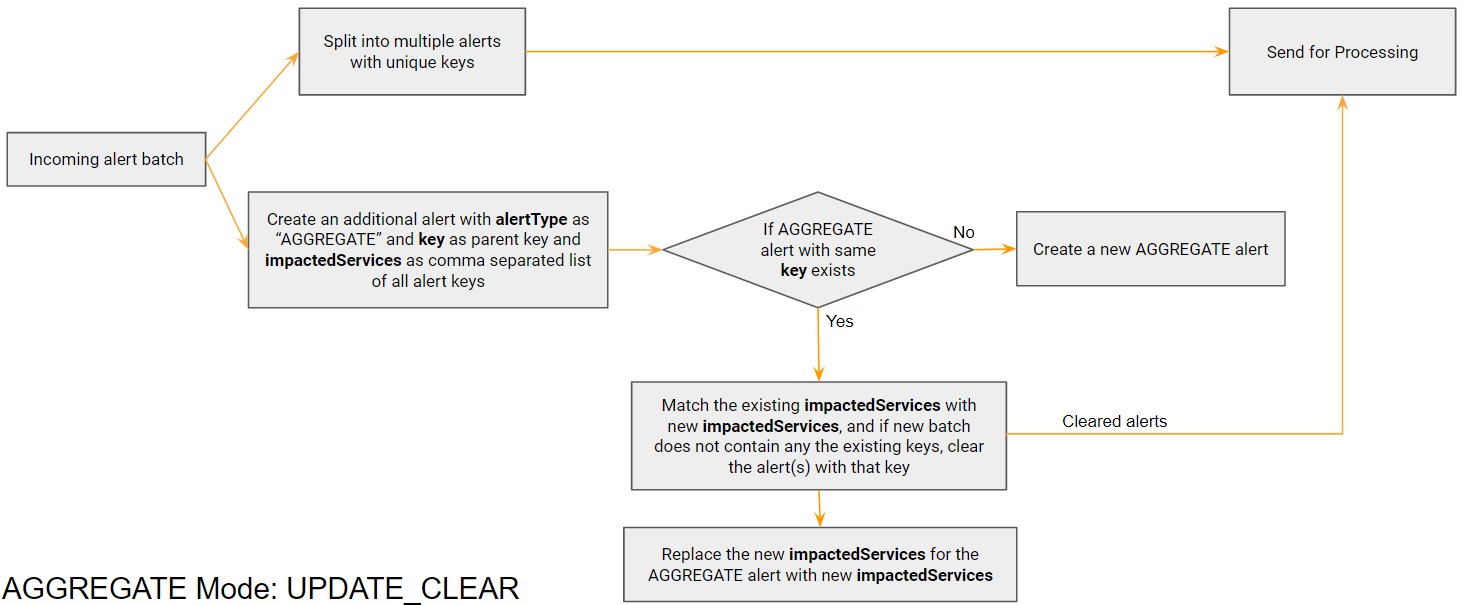
Example payload for Grafana that uses update_clear mechanism. Each evalMatches is one individual alert:
Given below two examples State is alerting but Memory anomaly is not present in the new alert, that means memory alert has been cleared
{
 "dashboardId": 18,
 "evalMatches": [
   {
     "value": 764.1657985453642,
     "metric": "10.95.124.111:9100 - CPU App Anomaly",
     "tags": {
       "exported_job": "Petclinic-App-Host",
       "instance": "10.95.124.111:9777",
       "job": "cfxEdgeAI",
       "mode": "user"
     }
   },
   {
     "value": 500.3642,
     "metric": "10.95.124.111:9100 - Memory Anomaly",
     "tags": {
       "exported_job": "Petclinic-App-Host",
       "instance": "10.95.124.111:9099",
       "job": "mem",
       "mode": "user"
     }
   }
 ],
 "message": "CPU Usage Anomaly Detected on ${exported_instance}",
 "orgId": 1,
 "panelId": 36,
 "ruleId": 3,
 "ruleName": "CPU - Application Usage Summary (AI) alert",
 "ruleUrl": "http://127.0.0.1:3000/…/viewPanel=36&orgId=1",
 "state": "alerting",
 "tags": {
   "Alert Source": "$exported_instance",
   "Alert Type": "High CPU"
 },
 "title": "[Alerting] CPU - Application Usage Summary (AI) alert"
}
{
 "dashboardId": 18,
 "evalMatches": [
   {
     "value": 764.1657985453642,
     "metric": "10.95.124.111:9100 - CPU App Anomaly",
     "tags": {
       "exported_job": "Petclinic-App-Host",
       "instance": "10.95.124.111:9777",
       "job": "cfxEdgeAI",
       "mode": "user"
     }
   }
 ],
 "message": "CPU Usage Anomaly Detected on ${exported_instance}",
 "orgId": 1,
 "panelId": 36,
 "ruleId": 3,
 "ruleName": "CPU - Application Usage Summary (AI) alert",
 "ruleUrl": "http://127.0.0.1:3000/…/viewPanel=36&orgId=1",
 "state": "alerting",
 "tags": {
   "Alert Source": "$exported_instance",
   "Alert Type": "High CPU"
 },
 "title": "[Alerting] CPU - Application Usage Summary (AI) alert"
}
{
 "dashboardId": 18,
 "evalMatches": [
   {
     "value": 764.1657985453642,
     "metric": "10.95.124.111:9100 - CPU App Anomaly",
     "tags": {
       "exported_job": "Petclinic-App-Host",
       "instance": "10.95.124.111:9777",
       "job": "cfxEdgeAI",
       "mode": "user"
     }
   },
   {
     "value": 500.3642,
     "metric": "10.95.124.111:9100 - Memory Anomaly",
     "tags": {
       "exported_job": "Petclinic-App-Host",
       "instance": "10.95.124.111:9099",
       "job": "mem",
       "mode": "user"
     }
   }
 ],
 "message": "CPU Usage Anomaly Detected on ${exported_instance}",
 "orgId": 1,
 "panelId": 36,
 "ruleId": 3,
 "ruleName": "CPU - Application Usage Summary (AI) alert",
 "ruleUrl": "http://127.0.0.1:3000/…/viewPanel=36&orgId=1",
 "state": "alerting",
 "tags": {
   "Alert Source": "$exported_instance",
   "Alert Type": "High CPU"
 },
 "title": "[Alerting] CPU - Application Usage Summary (AI) alert"
}
{
 "dashboardId": 18,
 "evalMatches": [],
 "message": "CPU Usage Anomaly Detected on ${exported_instance}",
 "orgId": 1,
 "panelId": 36,
 "ruleId": 3,
 "ruleName": "CPU - Application Usage Summary (AI) alert",
 "ruleUrl": "http://127.0.0.1:3000/…/viewPanel=36&orgId=1",
 "state": "close",
 "tags": {
   "Alert Source": "$exported_instance",
   "Alert Type": "High CPU"
 },
 "title": "[Alerting] CPU - Application Usage Summary (AI) alert"
}
python code for UPDATE_CLEAR can be found Here
3.2 APPEND
In a scenario where the source sends alerts for the same parent at different times, but a clear is sent only for the parent, we need to append the alerts belonging to same parent to the same AGGREGATE alert. For this we first create an aggregate alert for the parent and keep updating this alert with new child alert IDs. When a clear alert comes, all the child alerts in impactedServices get cleared.
Tip
Please click on the picture below to enlarge and to go back to the page please click on the back arrow button on the top.
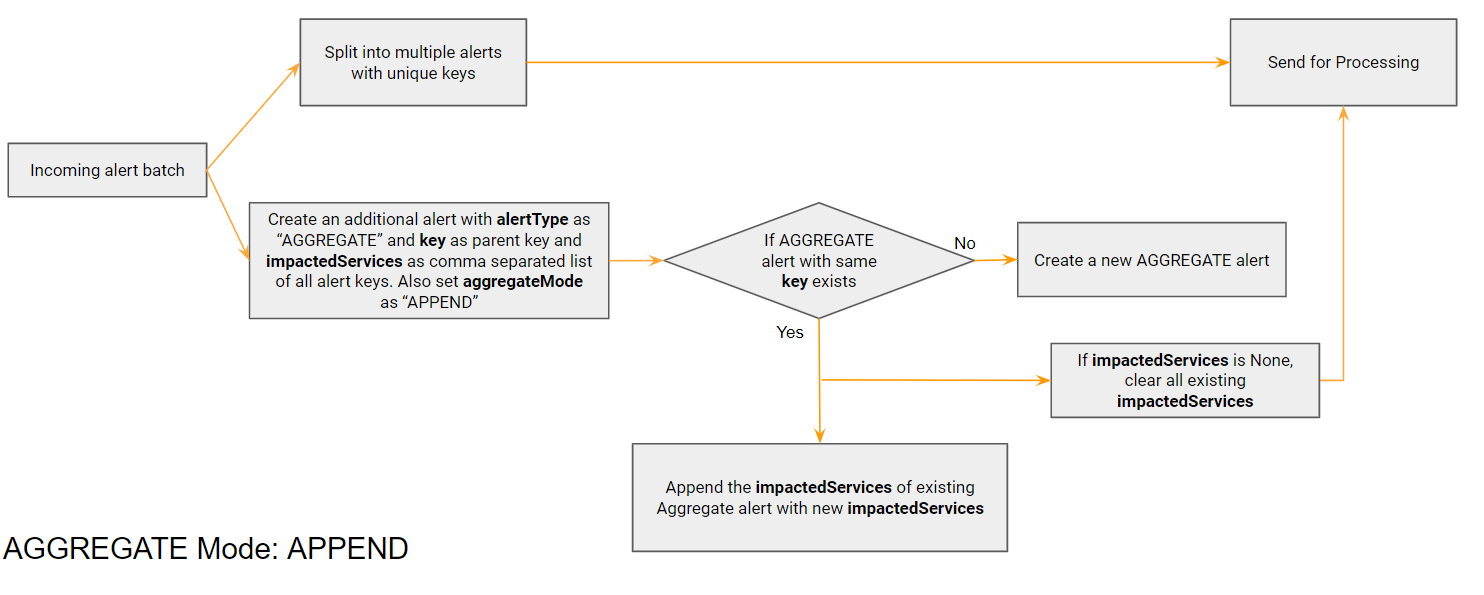
Example payload that uses APPEND mechanism. Child alert key is alertId + signatures. Parent key is alertId. If status = close comes for 86004, all child alerts with parent key as 86004 are cleared
{
  "alertId": 86004,
  "createdDate": "2022-11-24 17:04:45 IST",
  "status": "open",
  "subject": "[mDDoS] Host Detection alert #86004 incoming to 10.10.2.10",
  "description": "DoS host detection alert started at 2022-11-24 11:19:42. alert ended at 2022-11-24 11:34:45 UTC.",
  "host": "10.10.2.10",
  "url": "https://10.10.2.10/catalyst/#/ddos/attack-view/86004",
  "signatures": "SIP (bps)",
  "impact": "103.68Mbps/9kpps",
  "importance": "High",
  "managedObjects": "ABC_XYZ_Pune",
  "alert_duration": 15
}
{
  "alertId": 86004,
  "createdDate": "2022-11-24 18:04:45 IST",
  "status": "close",
  "subject": "[mDDoS] Host Detection alert #86004 incoming to 10.10.2.10",
  "description": "DoS host detection alert started at 2022-11-24 11:19:42. alert ended at 2022-11-24 11:34:45 UTC.",
  "host": "10.10.2.10",
  "url": "https://10.10.2.10/catalyst/#/ddos/attack-view/86004",
  "signatures": "XYZ",
  "impact": "103.68Mbps/9kpps",
  "importance": "High",
  "managedObjects": "ABC_XYZ_Pune",
  "alert_duration": 15
}