Upgrade to 3.2.2.2 and 7.2.2.2
1. Upgrade from 7.2.2.1 to 7.2.2.2
RDAF Platform: From 3.2.2.x to 3.2.2.2
OIA (AIOps) Application: From 7.2.2.x to 7.2.2.2
RDAF Deployment rdaf & rdafk8s CLI: From 1.1.9.x to 1.1.9.2
RDAF Client rdac CLI: From 3.2.2.x to 3.2.2.2
1.1. Prerequisites
Before proceeding with this upgrade, please make sure and verify the below prerequisites are met.
-
RDAF Deployment CLI version: 1.1.9.1
-
Infra Services tag: 1.0.2, 1.0.2.1(nats)
-
Platform Services and RDA Worker tag: 3.2.2.1
-
OIA Application Services tag: 7.2.2.1
-
CloudFabrix recommends taking VMware VM snapshots where RDA Fabric infra/platform/applications are deployed
-
RDAF Deployment CLI version: 1.1.9
-
Infra Services tag: 1.0.2,1.0.2.1(nats)
-
Platform Services and RDA Worker tag: 3.2.2
-
OIA Application Services tag: 7.2.2
-
CloudFabrix recommends taking VMware VM snapshots where RDA Fabric infra/platform/applications are deployed
Useful Information
Warning
Make sure all of the above pre-requisites are met before proceeding with the upgrade process.
Warning
Kubernetes: Though Kubernetes based RDA Fabric deployment supports zero downtime upgrade, it is recommended to schedule a maintenance window for upgrading RDAF Platform and AIOps services to newer version.
Important
Please make sure full backup of the RDAF platform system is completed before performing the upgrade.
Kubernetes: Please run the below backup command to take the backup of application data.
Run the below command on RDAF Management system and make sure the Kubernetes PODs are NOT in restarting mode (it is applicable to only Kubernetes environment)
Warning
Make sure all of the above pre-requisites are met before proceeding with the upgrade process.
Warning
Non-Kubernetes: Upgrading RDAF Platform and AIOps application services is a disruptive operation. Schedule a maintenance window before upgrading RDAF Platform and AIOps services to newer version.
Important
Please make sure full backup of the RDAF platform system is completed before performing the upgrade.
Non-Kubernetes: Please run the below backup command to take the backup of application data.
Note: Please make sure this backup-dir is mounted across all infra,cli vms.- Verify that RDAF deployment
rdafcli version is 1.1.9 orrdafk8scli version is 1.1.9.1 on the VM where CLI was installed for docker on-prem registry and managing Kubernetes or Non-kubernetes deployments.
- On-premise docker registry service version is 1.0.2
- RDAF Infrastructure services version is 1.0.2 (
rda-natsservice version is1.0.2.1andrda-minioservice version isRELEASE.2022-11-11T03-44-20Z)
Run the below command to get RDAF Infra services details
- RDAF Platform services version is 3.2.2.1
Run the below command to get RDAF Platform services details
- RDAF OIA Application services version is 7.2.2.1
Run the below command to get RDAF App services details
Run the below command to get RDAF Infra services details
- RDAF Platform services version is 3.2.2
Run the below command to get RDAF Platform services details
- RDAF OIA Application services version is 7.2.2
Run the below command to get RDAF App services details
RDAF Deployment CLI Upgrade:
Please follow the below given steps.
Note
Upgrade RDAF Deployment CLI on both on-premise docker registry VM and RDAF Platform's management VM if provisioned separately.
Login into the VM where rdaf & rdafk8s deployment CLI was installed for docker on-prem registry and managing Kubernetes or Non-kubernetes deployment.
- Download the RDAF Deployment CLI's newer version 1.1.9.2 bundle.
- Upgrade the
rdaf & rdafk8sCLI to version 1.1.9.2
- Verify the installed
rdaf & rdafk8sCLI version is upgraded to 1.1.9.2
- Download the RDAF Deployment CLI's newer version 1.1.9.2 bundle and copy it to RDAF management VM on which
rdaf & rdafk8sdeployment CLI was installed.
- Extract the
rdafCLI software bundle contents
- Change the directory to the extracted directory
- Upgrade the
rdafCLI to version 1.1.9.2
- Verify the installed
rdafCLI version
- Download the RDAF Deployment CLI's newer version 1.1.9.2 bundle
- Upgrade the
rdafCLI to version 1.1.9.2
- Verify the installed
rdafCLI version is upgraded to 1.1.9.2
- To stop application services, run the below command. Wait until all of the services are stopped.
- To stop RDAF worker services, run the below command. Wait until all of the services are stopped.
- To stop RDAF platform services, run the below command. Wait until all of the services are stopped.
- Download the RDAF Deployment CLI's newer version 1.1.9.2 bundle and copy it to RDAF management VM on which
rdaf & rdafk8sdeployment CLI was installed.
- Extract the
rdafCLI software bundle contents
- Change the directory to the extracted directory
- Upgrade the
rdafCLI to version 1.1.9.2
- Verify the installed
rdafCLI version
1.2. Download the new Docker Images
Download the new docker image tags for RDAF Platform and OIA Application services and wait until all of the images are downloaded.
Run the below command to verify above mentioned tags are downloaded for all of the RDAF Platform and OIA Application services.
Please make sure 1.0.2.1 image tag is downloaded for the below RDAF Infra services.
- rda-platform-haproxy
Please make sure 3.2.2.2 image tag is downloaded for the below RDAF Platform services.
- rda-client-api-server
- rda-registry
- rda-rda-scheduler
- rda-collector
- rda-stack-mgr
- rda-identity
- rda-fsm
- rda-access-manager
- rda-resource-manager
- rda-user-preferences
- onprem-portal
- onprem-portal-nginx
- rda-worker-all
- onprem-portal-dbinit
- cfxdx-nb-nginx-all
- rda-event-gateway
- rdac
- rdac-full
Please make sure 3.2.2.3 image tag is downloaded for the below RDAF Platform services.
- rda-client-api-server
- rda-worker-all
- cfxdx-nb-nginx-all
Please make sure 7.2.2.2 image tag is downloaded for the below RDAF OIA Application services.
- rda-app-controller
- rda-alert-processor
- rda-file-browser
- rda-smtp-server
- rda-ingestion-tracker
- rda-reports-registry
- rda-ml-config
- rda-event-consumer
- rda-webhook-server
- rda-irm-service
- rda-alert-ingester
- rda-collaboration
- rda-notification-service
- rda-configuration-service
Please make sure 7.2.2.3 image tag is downloaded for the below RDAF OIA Application services.
- rda-irm-service
Downloaded Docker images are stored under the below path.
/opt/rdaf/data/docker/registry/v2
Run the below command to check the filesystem's disk usage on which docker images are stored.
Optionally, If required, older image-tags which are no longer used can be deleted to free up the disk space using the below command.
1.3.Upgrade Steps
1.3.1 Upgrade RDAF Infra Services
Download the below python script (rdaf_upgrade_119_119_1_to_119_2.py)
wget https://macaw-amer.s3.amazonaws.com/releases/rdaf-platform/1.1.9.2/rdaf_upgrade_119_119_1_to_119_2.py
Please run the downloaded python script. It generates a new values.yaml.latest with new environment variables for HAProxy infrastructure service and rda-portal (front-end) platform service.
These environment variables need to be configured with appropriate values when CFX RDA Fabric portal need to be integrated and cross launched from 3rd party end user UI portal.
Note
Below mentioned environment variables are mandatory, however, their values can be left empty if integration with 3rd party external UI portal is not required.
- HAProxy environment variables
EXTERNAL_PORTAL_URL: 3rd party UI portal url (ex: https://external-portal.acme.com)
CFX_IP_ADDRESS: RDA Fabric platform's load balancer's virtual IP address (when configured in HA) or load balancer's IP address to access the UI portal.
- rda-protal (front-end) environment variable
CFX_URL_PREFIX: Specify custom base URI string which can be used within the 3rd party end user UI portal to redirect the requests to RDA Fabric platform.
Please run the downloaded python upgrade script.
Once the script is executed it will create /opt/rdaf/deployment-scripts/values.yaml.latest file.
Note
Please take a backup of /opt/rdaf/deployment-scripts/values.yaml file.
cp /opt/rdaf/deployment-scripts/values.yaml /opt/rdaf/deployment-scripts/values.yaml.backup
Edit /opt/rdaf/deployment-scripts/values.yaml and apply the below changes for haproxy and rda_portal services
Under haproxy service configuration, set the environment variable EXTERNAL_PORTAL_URL with external portal URL. Note: https://external-portal.acme.com is used for a reference only. Also, set the environment variable CFX_IP_ADDRESS with RDA Fabric load-balancer's IP address (non-HA configuration) or virtual IP address when configured in HA.
haproxy:
  mem_limit: 2G
  memswap_limit: 2G
  environment:
    EXTERNAL_PORTAL_URL: "https://external-portal.acme.com"
    CFX_IP_ADDRESS: "<rda-fabric-ui-portal-ip>"
Under rda_portal service configuration, set the environment variable CFX_URL_PREFIX with customer URI string as shown below. Note: aiops is used for a reference only. When configured, all requests which hits https://external-portal.acme.com/aiops URI path on 3rd party UI portal, requests are forwarded to RDA Fabric platform and vice-versa.
rda_portal:
  ...
  ...
    portal_frontend:
      resources:
        requests:
          memory: 100Mi
      limits:
          memory: 2Gi
      env:
        CFX_URL_PREFIX: "aiops"
Configure the environment variables with empty values when 3rd party external portal integration is NOT needed.
rda_portal:
  ...
  ...
    portal_frontend:
      resources:
        requests:
          memory: 100Mi
      limits:
          memory: 2Gi
      env:
        CFX_URL_PREFIX: ""
-
Upgrade HAProxy service using below command
Run the below RDAF command to check infra status
+----------------+----------------+-------------+--------------+---------+
| Name           | Host           | Status      | Container Id | Tag     |
+----------------+----------------+-------------+--------------+---------+
| haproxy        | 192.168.131.41 | Up 25 hours | 21ce252eec14 | 1.0.2.1 |
| haproxy        | 192.168.131.42 | Up 25 hours | 329a6aa40e40 | 1.0.2.1 |
| keepalived     | 192.168.131.41 | active      | N/A          | N/A     |
| keepalived     | 192.168.131.42 | active      | N/A          | N/A     |
| nats           | 192.168.131.41 | Up 2 months | 7b7a15f7d742 | 1.0.2.1 |
| nats           | 192.168.131.42 | Up 2 months | a92cd1df2cbf | 1.0.2.1 |
+----------------+----------------+-----------------+--------------+-----+
Before initiating the upgrade steps, RDA Fabric platform, worker and application services need to be stopped.
- To stop OIA application services, run the below command. Wait until all of the services are stopped.
- To stop RDAF worker services, run the below command. Wait until all of the services are stopped.
- To stop RDAF platform services, run the below command. Wait until all of the services are stopped.
- Upgrade HAProxy using below command
Run the below RDAF command to check infra status
+----------------+----------------+-------------+--------------+---------+
| Name           | Host           | Status      | Container Id | Tag     |
+----------------+----------------+-------------+--------------+---------+
| haproxy        | 192.168.107.63 | Up 25 hours | 21ce252eec14 | 1.0.2.1 |
| haproxy        | 192.168.107.64 | Up 25 hours | 329a6aa40e40 | 1.0.2.1 |
| keepalived     | 192.168.107.63 | active      | N/A          | N/A     |
| keepalived     | 192.168.107.64 | active      | N/A          | N/A     |
| nats           | 192.168.107.63 | Up 2 months | 7b7a15f7d742 | 1.0.2.1 |
| nats           | 192.168.107.64 | Up 2 months | a92cd1df2cbf | 1.0.2.1 |
+----------------+----------------+-----------------+--------------+-----+
Run the below RDAF command to check infra healthcheck status
+----------------+-----------------+--------+----------------------+--------------+-----------------+
| Name           | Check           | Status | Reason               | Host          | Container Id   |
+----------------+-----------------+--------+----------------------+--------------+-----------------+
| haproxy        | Port Connection | OK     | N/A                  | 192.168.107.63 | ed0e8a4f95d6  |
| haproxy        | Service Status  | OK     | N/A                  | 192.168.107.63 | ed0e8a4f95d6  |
| haproxy        | Firewall Port   | OK     | N/A                  | 192.168.107.63 | ed0e8a4f95d6  |
| haproxy        | Port Connection | OK     | N/A                  | 192.168.107.64 | 91c361ea0f58  |
| haproxy        | Service Status  | OK     | N/A                  | 192.168.107.64 | 91c361ea0f58  |
| haproxy        | Firewall Port   | OK     | N/A                  | 192.168.107.64 | 91c361ea0f58  |
| keepalived     | Service Status  | OK     | N/A                  | 192.168.107.63 | N/A           |
| keepalived     | Service Status  | OK     | N/A                  | 192.168.107.64 | N/A           |
| nats           | Port Connection | OK     | N/A                  | 192.168.107.63 | f57ed825681b  |
| nats           | Service Status  | OK     | N/A                  | 192.168.107.63 | f57ed825681b  |
+----------------+-----------------+--------+----------------------+--------------+-----------------+
1.3.2 Upgrade RDAF Platform Services
Step-1: Run the below command to initiate upgrading RDAF Platform services.
As the upgrade procedure is a non-disruptive upgrade, it puts the currently running PODs into Terminating state and newer version PODs into Pending state.
Step-2: Run the below command to check the status of the existing and newer PODs and make sure atleast one instance of each Platform service is in Terminating state.
Step-3: Run the below command to put all Terminating RDAF platform service PODs into maintenance mode. It will list all of the POD Ids of platform services along with rdac maintenance command that required to be put in maintenance mode.
Note
If maint_command.py script doesn't exist on RDAF deployment CLI VM, it can be downloaded using the below command.
Step-4: Copy & Paste the rdac maintenance command as below.
Step-5: Run the below command to verify the maintenance mode status of the RDAF platform services.
Step-6: Run the below command to delete the Terminating RDAF platform service PODs
for i in `kubectl get pods -n rda-fabric -l app_category=rdaf-platform | grep 'Terminating' | awk '{print $1}'`; do kubectl delete pod $i -n rda-fabric --force; done
Note
Wait for 120 seconds and Repeat above steps from Step-2 to Step-6 for rest of the RDAF Platform service PODs.
Please wait till all of the new platform service PODs are in Running state and run the below command to verify their status and make sure all of them are running with 3.2.2.2 version.
+----------------------+----------------+----------------+--------------+---------+
| Name                 | Host           | Status         | Container Id | Tag     |
+----------------------+----------------+----------------+--------------+---------+
| rda-api-server       | 192.168.131.44 | Up 1 Hours ago | f97c1658a0b7 | 3.2.2.2 |
| rda-api-server       | 192.168.131.44 | Up 1 Days ago  | 99cc29596560 | 3.2.2.2 |
| rda-registry         | 192.168.131.44 | Up 1 Days ago  | ee2d72396575 | 3.2.2.2 |
| rda-registry         | 192.168.131.44 | Up 2 Hours ago | 95c36fc91800 | 3.2.2.2 |
| rda-identity         | 192.168.131.44 | Up 1 Days ago  | 3d6aeb4c6c53 | 3.2.2.2 |
| rda-identity         | 192.168.131.44 | Up 2 Hours ago | 9303f3d0e7ed | 3.2.2.2 |
| rda-fsm              | 192.168.131.44 | Up 2 Hours ago | 342cbfe89b78 | 3.2.2.2 |
| rda-fsm              | 192.168.131.44 | Up 1 Days ago  | 5e77c12fc920 | 3.2.2.2 |
| rda-access-manager   | 192.168.131.44 | Up 2 Hours ago | b218a44f022c | 3.2.2.2 |
| rda-access-manager   | 192.168.131.44 | Up 1 Days ago  | 70ed48e783b9 | 3.2.2.2 |
+----------------------+--------------+----------------+--------------+-----------+
Run the below command to check rda-fsm service is up and running and also verify that one of the rda-scheduler service is elected as a leader under Site column.
+-------+----------------------------------------+-------------+--------------+----------+-------------+-----------------+--------+--------------+---------------+--------------+
| Cat   | Pod-Type                               | Pod-Ready   | Host         | ID       | Site        | Age             |   CPUs |   Memory(GB) | Active Jobs   | Total Jobs   |
|-------+----------------------------------------+-------------+--------------+----------+-------------+-----------------+--------+--------------+---------------+--------------|
| Infra | api-server                             | True        | 40d242cf70f5 | 6f7ecfe2 |             | 2 days, 7:40:27 |      8 |        31.33 |               |              |
| Infra | api-server                             | True        | 9145166d798b | 6114b271 |             | 2 days, 7:40:52 |      8 |        31.33 |               |              |
| Infra | collector                              | True        | a450b3da5188 | 1a86bf07 |             | 2 days, 7:39:59 |      8 |        31.33 |               |              |
| Infra | collector                              | True        | 82ccb77d84e7 | 46c83c44 |             | 2 days, 7:39:44 |      8 |        31.33 |               |              |
| Infra | registry                               | True        | c93e2eff7c37 | 30ad85d6 |             | 2 days, 7:40:32 |      8 |        31.33 |               |              |
| Infra | registry                               | True        | 44d01548a49c | 0bb96897 |             | 2 days, 7:40:26 |      8 |        31.33 |               |              |
| Infra | scheduler                              | True        | 159d453aad50 | 2cb4831c | *leader*    | 2 days, 7:40:20 |      8 |        31.33 |               |              |
| Infra | scheduler                              | True        | 0682962441e4 | d6b1fb3b |             | 2 days, 7:40:12 |      8 |        31.33 |               |              |
|-------+----------------------------------------+-------------+--------------+----------+-------------+-----------------+--------+--------------+---------------+--------------|
Run the below command to check if all services has ok status and does not throw any failure messages.
Warning
For Non-Kubernetes deployment, upgrading RDAF Platform and AIOps application services is a disruptive operation. Please schedule a maintenance window before upgrading RDAF Platform and AIOps services to newer version.
Run the below command to initiate upgrading RDAF Platform services.
Please wait till all of the new platform service are in Up state and run the below command to verify their status and make sure all of them are running with 3.2.2.2 version.
+--------------------------+----------------+---------------+--------------+---------+
| Name                     | Host           | Status        | Container Id | Tag     |
+--------------------------+----------------+---------------+--------------+---------+
| rda_api_server           | 192.168.107.61 | Up 58 minutes | 9145166d798b | 3.2.2.2 |
| rda_api_server           | 192.168.107.62 | Up 57 minutes | 40d242cf70f5 | 3.2.2.2 |
| rda_registry             | 192.168.107.61 | Up 57 minutes | c93e2eff7c37 | 3.2.2.2 |
| rda_registry             | 192.168.107.62 | Up 57 minutes | 44d01548a49c | 3.2.2.2 |
| rda_scheduler            | 192.168.107.61 | Up 57 minutes | 159d453aad50 | 3.2.2.2 |
| rda_scheduler            | 192.168.107.62 | Up 57 minutes | 0682962441e4 | 3.2.2.2 |
| rda_collector            | 192.168.107.61 | Up 56 minutes | a450b3da5188 | 3.2.2.2 |
| rda_collector            | 192.168.107.62 | Up 56 minutes | 82ccb77d84e7 | 3.2.2.2 |
+--------------------------+--------------+---------------+--------------+-----------+
Run the below command to check rda-fsm service is up and running and also verify that one of the rda-scheduler service is elected as a leader under Site column.
Run the below command to check if all services has ok status and does not throw any failure messages.
+-----------+----------------------------------------+--------------+----------+-------------+-----------------------------------------------------+----------+-------------------------------------------------------------+
| Cat       | Pod-Type                               | Host         | ID       | Site        | Health Parameter                                    | Status   | Message                                                     |
|-----------+----------------------------------------+--------------+----------+-------------+-----------------------------------------------------+----------+-------------------------------------------------------------|
| rda_app   | alert-ingester                         | 9a0775246a0f | 8f538695 |             | service-status                                      | ok       |                                                             |
| rda_app   | alert-ingester                         | 9a0775246a0f | 8f538695 |             | minio-connectivity                                  | ok       |                                                             |
| rda_app   | alert-ingester                         | 9a0775246a0f | 8f538695 |             | service-dependency:configuration-service            | ok       | 2 pod(s) found for configuration-service                    |
| rda_app   | alert-ingester                         | 9a0775246a0f | 8f538695 |             | service-initialization-status                       | ok       |                                                             |
| rda_app   | alert-ingester                         | 9a0775246a0f | 8f538695 |             | kafka-connectivity                                  | ok       | Cluster=F8PAtrvtRk6RbMZgp7deHQ, Broker=3, Brokers=[2, 3, 1] |
| rda_app   | alert-ingester                         | 79d6756db639 | 95921403 |             | service-status                                      | ok       |                                                             |
| rda_app   | alert-ingester                         | 79d6756db639 | 95921403 |             | minio-connectivity                                  | ok       |                                                             |
| rda_app   | alert-ingester                         | 79d6756db639 | 95921403 |             | service-dependency:configuration-service            | ok       | 2 pod(s) found for configuration-service                    |
| rda_app   | alert-ingester                         | 79d6756db639 | 95921403 |             | service-initialization-status                       | ok       |                                                             |
| rda_app   | alert-ingester                         | 79d6756db639 | 95921403 |             | kafka-connectivity                                  | ok       | Cluster=F8PAtrvtRk6RbMZgp7deHQ, Broker=1, Brokers=[2, 3, 1] |
+-----------+----------------------------------------+--------------+----------+-------------+-----------------------------------------------------+----------+-------------------------------------------------------------+
1.3.3 Upgrade rdac CLI
1.3.4 Upgrade RDA Worker Services
Step-1: Please run the below command to initiate upgrading the RDA Worker service PODs.
Step-2: Run the below command to check the status of the existing and newer PODs and make sure atleast one instance of each RDA Worker service POD is in Terminating state.
Step-3: Run the below command to put all Terminating RDAF worker service PODs into maintenance mode. It will list all of the POD Ids of RDA worker services along with rdac maintenance command that is required to be put in maintenance mode.
Step-4: Copy & Paste the rdac maintenance command as below.
Step-5: Run the below command to verify the maintenance mode status of the RDAF worker services.
Step-6: Run the below command to delete the Terminating RDAF worker service PODs
for i in `kubectl get pods -n rda-fabric -l app_component=rda-worker | grep 'Terminating' | awk '{print $1}'`; do kubectl delete pod $i -n rda-fabric --force; done
Note
Wait for 120 seconds between each RDAF worker service upgrade by repeating above steps from Step-2 to Step-6 for rest of the RDAF worker service PODs.
Step-7: Please wait for 120 seconds to let the newer version of RDA Worker service PODs join the RDA Fabric appropriately. Run the below commands to verify the status of the newer RDA Worker service PODs.
+------------+----------------+---------------+--------------+-----------+
| Name       | Host           | Status        | Container Id | Tag       |
+------------+----------------+---------------+--------------+-----------+
| rda-worker | 192.168.131.49 | Up 2 Days ago | 7f5cc2a6ff82 | 3.2.2.3   |
| rda-worker | 192.168.131.50 | Up 2 Days ago | 17e06d02128d | 3.2.2.3   |
+------------+----------------+---------------+--------------+-----------+
Step-8: Run the below command to check if all RDA Worker services has ok status and does not throw any failure messages.
- Upgrade RDA Worker Services
Please run the below command to initiate upgrading the RDA Worker service PODs.
Please wait for 120 seconds to let the newer version of RDA Worker service containers join the RDA Fabric appropriately. Run the below commands to verify the status of the newer RDA Worker service containers.
+------------+----------------+------------+--------------+---------+
| Name       | Host           | Status     | Container Id | Tag     |
+------------+----------------+------------+--------------+---------+
| rda_worker | 192.168.107.61 | Up 2 hours | aa8319a88bc1 | 3.2.2.3 |
| rda_worker | 192.168.107.62 | Up 2 hours | 56e78986283f | 3.2.2.3 |
+------------+----------------+------------+--------------+---------+
1.3.5 Upgrade OIA Application Services
Step-1: Run the below commands to initiate upgrading RDAF OIA Application services
Step-2: Run the below command to check the status of the existing and newer PODs and make sure atleast one instance of each OIA application service is in Terminating state.
Step-3: Run the below command to put all Terminating OIA application service PODs into maintenance mode. It will list all of the POD Ids of OIA application services along with rdac maintenance command that are required to be put in maintenance mode.
Step-4: Copy & Paste the rdac maintenance command as below.
Step-5: Run the below command to verify the maintenance mode status of the OIA application services.
Step-6: Run the below command to delete the Terminating OIA application service PODs
for i in `kubectl get pods -n rda-fabric -l app_name=oia | grep 'Terminating' | awk '{print $1}'`; do kubectl delete pod $i -n rda-fabric --force; done
Note
Wait for 120 seconds and Repeat above steps from Step-2 to Step-6 for rest of the OIA application service PODs.
Please wait till all of the new OIA application service PODs are in Running state and run the below command to verify their status and make sure they are running with 7.2.2.2 version.
+-------------------------------+----------------+-----------------+--------------+-----------+
| Name                          | Host           | Status          | Container Id | Tag       |
+-------------------------------+----------------+-----------------+--------------+-----------+
| rda-alert-ingester            | 192.168.131.46 | Up 1 Days ago   | f546428c2a1a | 7.2.2.2   |
| rda-alert-ingester            | 192.168.131.46 | Up 1 Days ago   | 88a68aa40a9a | 7.2.2.2   |
| rda-alert-processor           | 192.168.131.46 | Up 1 Days ago   | 5d958ce95d4c | 7.2.2.2   |
| rda-alert-processor           | 192.168.131.46 | Up 1 Days ago   | cddbfed7dbba | 7.2.2.2   |
| rda-alert-processor-companion | 192.168.131.46 | Up 1 Days ago   | 127cd9e895a1 | 7.2.2.2   |
| rda-alert-processor-companion | 192.168.131.46 | Up 1 Days ago   | 1ac3ae88d16f | 7.2.2.2   |
| rda-app-controller            | 192.168.131.46 | Up 1 Days ago   | cf7d126099a6 | 7.2.2.2   |
| rda-app-controller            | 192.168.131.46 | Up 1 Days ago   | fcd5bb29c429 | 7.2.2.2   |
| rda-collaboration             | 192.168.131.46 | Up 1 Days ago   | 9c3243fb3094 | 7.2.2.2   |
+-------------------------------+----------------+-----------------+--------------+-----------+
Step-7: Run the below command to verify all OIA application services are up and running. Please wait till the cfxdimensions-app-irm_service has leader status under Site column.
+-------+----------------------------------------+-------------+----------------+----------+-------------+----------------+--------+--------------+---------------+--------------+
| Cat   | Pod-Type                               | Pod-Ready   | Host           | ID       | Site        | Age            |   CPUs |   Memory(GB) | Active Jobs   | Total Jobs   |
|-------+----------------------------------------+-------------+----------------+----------+-------------+----------------+--------+--------------+---------------+--------------|
| App   | cfxdimensions-app-access-manager       | True        | 3a164c761ac7 | 6f02493c |             | 2 days, 7:38:22 |      8 |        31.33 |               |              |
| App   | cfxdimensions-app-access-manager       | True        | d56b629c2c3b | e5ff5696 |             | 2 days, 7:38:05 |      8 |        31.33 |               |              |
| App   | cfxdimensions-app-collaboration        | True        | 8aafda236efe | 126203ec |             | 2 days, 7:11:18 |      8 |        31.33 |               |              |
| App   | cfxdimensions-app-collaboration        | True        | 3ea382fdc6af | 618a650b |             | 2 days, 7:10:58 |      8 |        31.33 |               |              |
| App   | cfxdimensions-app-file-browser         | True        | d6f0d127ab06 | deb9c0c4 |             | 2 days, 7:17:45 |      8 |        31.33 |               |              |
| App   | cfxdimensions-app-file-browser         | True        | 2b9851b95094 | 013f5b00 |             | 2 days, 7:17:25 |      8 |        31.33 |               |              |
| App   | cfxdimensions-app-irm_service          | True        | 8361c0008d18 | a9fe343e | *leader*    | 2 days, 7:12:36 |      8 |        31.33 |               |              |
| App   | cfxdimensions-app-irm_service          | True        | ca8a2cbdca81 | 8f497bb7 |             | 2 days, 7:12:14 |      8 |        31.33 |               |              |
| App   | cfxdimensions-app-notification-service | True        | dfbbcdcddafc | 8d0425ec |             | 2 days, 7:18:24 |      8 |        31.33 |               |              |
| App   | cfxdimensions-app-notification-service | True        | 753472f0a9be | 485800b5 |             | 2 days, 7:18:06 |      8 |        31.33 |               |              |
+-------+----------------------------------------+-------------+----------------+----------+-------------+-------------------+--------+-----------------------------+--------------+
Run the below command to check if all services has ok status and does not throw any failure messages.
+-----------+----------------------------------------+--------------+----------+-------------+-----------------------------------------------------+----------+-------------------------------------------------------------+
| Cat       | Pod-Type                               | Host         | ID       | Site        | Health Parameter                                    | Status   | Message                                                     |
|-----------+----------------------------------------+--------------+----------+-------------+-----------------------------------------------------+----------+-------------------------------------------------------------|
| rda_app   | alert-ingester                         | rda-alert-in | 47518623 |             | service-status                                      | ok       |                                                             |
| rda_app   | alert-ingester                         | rda-alert-in | 47518623 |             | minio-connectivity                                  | ok       |                                                             |
| rda_app   | alert-ingester                         | rda-alert-in | 47518623 |             | service-dependency:configuration-service            | ok       | 2 pod(s) found for configuration-service                    |
| rda_app   | alert-ingester                         | rda-alert-in | 47518623 |             | service-initialization-status                       | ok       |                                                             |
| rda_app   | alert-ingester                         | rda-alert-in | 47518623 |             | kafka-connectivity                                  | ok       | Cluster=nzyeX9qkR-ChWXC0fRvSyQ, Broker=1, Brokers=[0, 2, 1] |
| rda_app   | alert-ingester                         | rda-alert-in | 82bcaa7c |             | service-status                                      | ok       |                                                             |
| rda_app   | alert-ingester                         | rda-alert-in | 82bcaa7c |             | minio-connectivity                                  | ok       |
+-----------+----------------------------------------+--------------+----------+-------------+-----------------------------------------------------+----------+-------------------------------------------------------------+
Upgrade rda-irm-service to 7.2.2.3:
Step-1: Run the below commands to initiate upgrading the rda-irm-service service
Step-2: Run the below command to check the status of the existing rda-irm-service PODs and make sure atleast one instance of rda-irm-service service is in Terminating state.
Step-3: Run the below command to put rda-irm-service that is in Terminating state into maintenance mode. It will list all of the rda-irm-service POD services along with rdac maintenance command that are required to be put in maintenance mode.
Step-4: Copy & Paste the rdac maintenance command as below.
Step-5: Run the below command to verify the maintenance mode status of the rda-irm-service
Step-6: Run the below command to delete the Terminating rda-irm-service service PODs
for i in `kubectl get pods -n rda-fabric -l app_name=oia | grep 'Terminating' | awk '{print $1}'`; do kubectl delete pod $i -n rda-fabric --force; done
Note
Wait for 120 seconds and Repeat above steps from Step-2 to Step-6 for rest of the rda-irm-service service PODs.
Please wait till all of the new rda-irm-service service PODs are in Running state and run the below command to verify their status and make sure they are running with 7.2.2.3 version.
+-------------------------------+----------------+-----------------+--------------+-----------+
| Name                          | Host           | Status          | Container Id | Tag       |
+-------------------------------+----------------+-----------------+--------------+-----------+
| rda-irm-service               | 192.168.131.46 | Up 1 Days ago   | f546428c2a1a | 7.2.2.3   |
| rda-irm-service               | 192.168.131.46 | Up 1 Days ago   | 88a68aa40a9a | 7.2.2.3   |
| rda-alert-processor           | 192.168.131.46 | Up 1 Days ago   | 5d958ce95d4c | 7.2.2.2   |
| rda-alert-processor           | 192.168.131.46 | Up 1 Days ago   | cddbfed7dbba | 7.2.2.2   |
+-------------------------------+----------------+-----------------+--------------+-----------+
Step-7: Run the below command to verify all rda-irm-service PODs are up and running. Please wait till the cfxdimensions-app-irm_service has leader status under Site column.
+-------+----------------------------------------+-------------+----------------+----------+-------------+----------------+--------+--------------+---------------+--------------+
| Cat   | Pod-Type                               | Pod-Ready   | Host           | ID       | Site        | Age            |   CPUs |   Memory(GB) | Active Jobs   | Total Jobs   |
|-------+----------------------------------------+-------------+----------------+----------+-------------+----------------+--------+--------------+---------------+--------------|
| App   | cfxdimensions-app-access-manager       | True        | 3a164c761ac7 | 6f02493c |             | 2 days, 7:38:22 |      8 |        31.33 |               |              |
| App   | cfxdimensions-app-access-manager       | True        | d56b629c2c3b | e5ff5696 |             | 2 days, 7:38:05 |      8 |        31.33 |               |              |
| App   | cfxdimensions-app-collaboration        | True        | 8aafda236efe | 126203ec |             | 2 days, 7:11:18 |      8 |        31.33 |               |              |
| App   | cfxdimensions-app-collaboration        | True        | 3ea382fdc6af | 618a650b |             | 2 days, 7:10:58 |      8 |        31.33 |               |              |
| App   | cfxdimensions-app-file-browser         | True        | d6f0d127ab06 | deb9c0c4 |             | 2 days, 7:17:45 |      8 |        31.33 |               |              |
| App   | cfxdimensions-app-file-browser         | True        | 2b9851b95094 | 013f5b00 |             | 2 days, 7:17:25 |      8 |        31.33 |               |              |
| App   | cfxdimensions-app-irm_service          | True        | 8361c0008d18 | a9fe343e | *leader*    | 2 days, 7:12:36 |      8 |        31.33 |               |              |
| App   | cfxdimensions-app-irm_service          | True        | ca8a2cbdca81 | 8f497bb7 |             | 2 days, 7:12:14 |      8 |        31.33 |               |              |
| App   | cfxdimensions-app-notification-service | True        | dfbbcdcddafc | 8d0425ec |             | 2 days, 7:18:24 |      8 |        31.33 |               |              |
| App   | cfxdimensions-app-notification-service | True        | 753472f0a9be | 485800b5 |             | 2 days, 7:18:06 |      8 |        31.33 |               |              |
+-------+----------------------------------------+-------------+----------------+----------+-------------+-------------------+--------+-----------------------------+--------------+
Run the below command to check if all services has ok status and does not throw any failure messages.
Run the below commands to initiate upgrading the RDA Fabric OIA Application services.
Please wait till all of the new OIA application service containers are in Up state and run the below command to verify their status and make sure they are running with 7.2.2.2 version.
+-------------------------------+----------------+-----------------+--------------+-----------+
| Name                          | Host           | Status          | Container Id | Tag       |
+-------------------------------+----------------+-----------------+--------------+-----------+
| rda-alert-ingester            | 192.168.131.46 | Up 1 Days ago   | f546428c2a1a | 7.2.2.2   |
| rda-alert-ingester            | 192.168.131.46 | Up 1 Days ago   | 88a68aa40a9a | 7.2.2.2   |
| rda-alert-processor           | 192.168.131.46 | Up 1 Days ago   | 5d958ce95d4c | 7.2.2.2   |
| rda-alert-processor           | 192.168.131.46 | Up 1 Days ago   | cddbfed7dbba | 7.2.2.2   |
| rda-alert-processor-companion | 192.168.131.46 | Up 1 Days ago   | 127cd9e895a1 | 7.2.2.2   |
| rda-alert-processor-companion | 192.168.131.46 | Up 1 Days ago   | 1ac3ae88d16f | 7.2.2.2   |
| rda-app-controller            | 192.168.131.46 | Up 1 Days ago   | cf7d126099a6 | 7.2.2.2   |
| rda-app-controller            | 192.168.131.46 | Up 1 Days ago   | fcd5bb29c429 | 7.2.2.2   |
| rda-collaboration             | 192.168.131.46 | Up 1 Days ago   | 9c3243fb3094 | 7.2.2.2   |
+-------------------------------+----------------+-----------------+--------------+-----------+
Upgrade rda-irm-service to 7.2.2.3:
Run the below commands to initiate upgrading the rda-irm-service service to 7.2.2.3 version.
Please wait till all of the rda-irm-service containers are in Up state and run the below command to verify their status and make sure they are running with 7.2.2.3 version.
1.4.Post Upgrade Steps
1.4.1 OIA
1. Deploy latest l1&l2 bundles. Go to Configuration --> RDA Administration --> Bundles --> Select oia_l1_l2_bundle and Click on deploy action
2. Enable ML experiments manually if any experiments are configured Organization --> Configuration --> ML Experiments
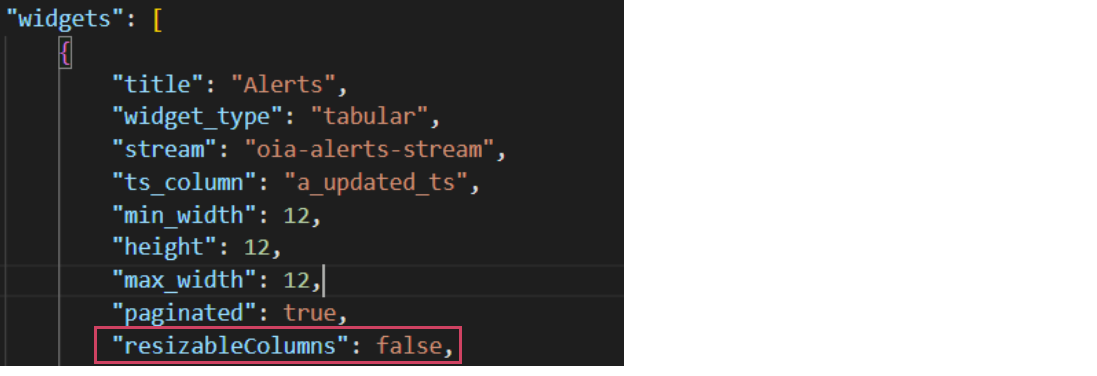
3. By default resizableColumns: false for alerts and incidents tabular report. If you want to resizable for alerts and incidents tabular report then make it true. Go to user Configuration -> RDA Administration -> User Dashboards then search below Dashboard
a) oia-alert-group-view-alerts-os
b) oia-alert-group-view-details-os
c) oia-alert-groups-os
d) oia-alert-tracking-os
e) oia-alerts-os
f) oia-event-tracking-os
g) oia-event-tracking-view-alerts
h) oia-incident-alerts-os
i) oia-view-alerts-policy
j) oia-view-groups-policy
k) incident-collaboration
l) oia-incidents-os-template
m) oia-incidents-os
n) oia-incidents
o) oia-my-incidents
1.4.2 DNAC
1. Make sure Prime credentials are added under Configuration → RDA Integrations → Credentials
Note
Make sure credential names matches with bot names specified below in Point No. 4
2. Deploy latest dna_center_bundle bundle from Configuration → RDA Integrations → Bundles → Click deploy action row level for dna_center_bundle.
3. Run dnac_create_pstreams pipeline from Configuration → RDA Integrations → Pipelines → Published Pipelines and search for dnac_create_pstreams and Click on Run in the action menu.
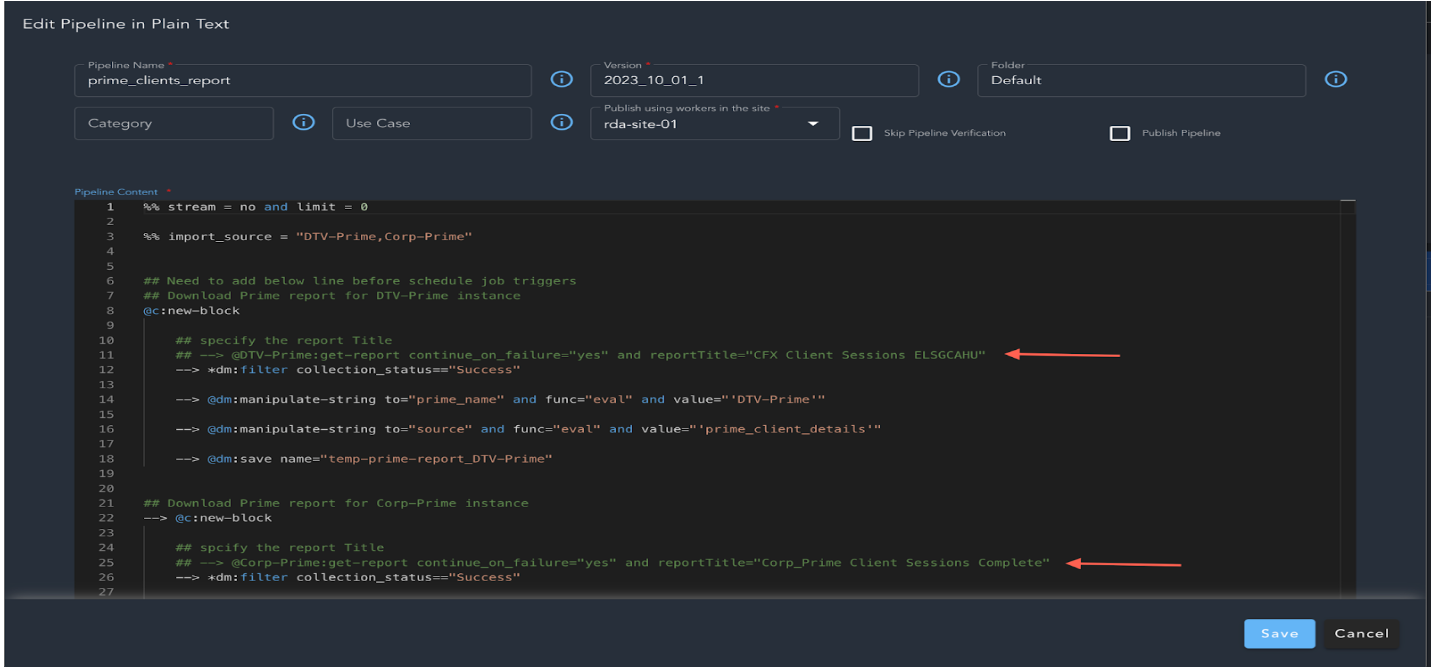
4. In the same Published Pipelines search for prime_clients_report and click on Edit Pipeline in Plain Text and uncomment the lines as shown below and change the version of pipeline and also check box publish pipeline and Click on Save
5. Download the latest DNAC template from below link to platform VM (where rdac is installed) and execute the command given below